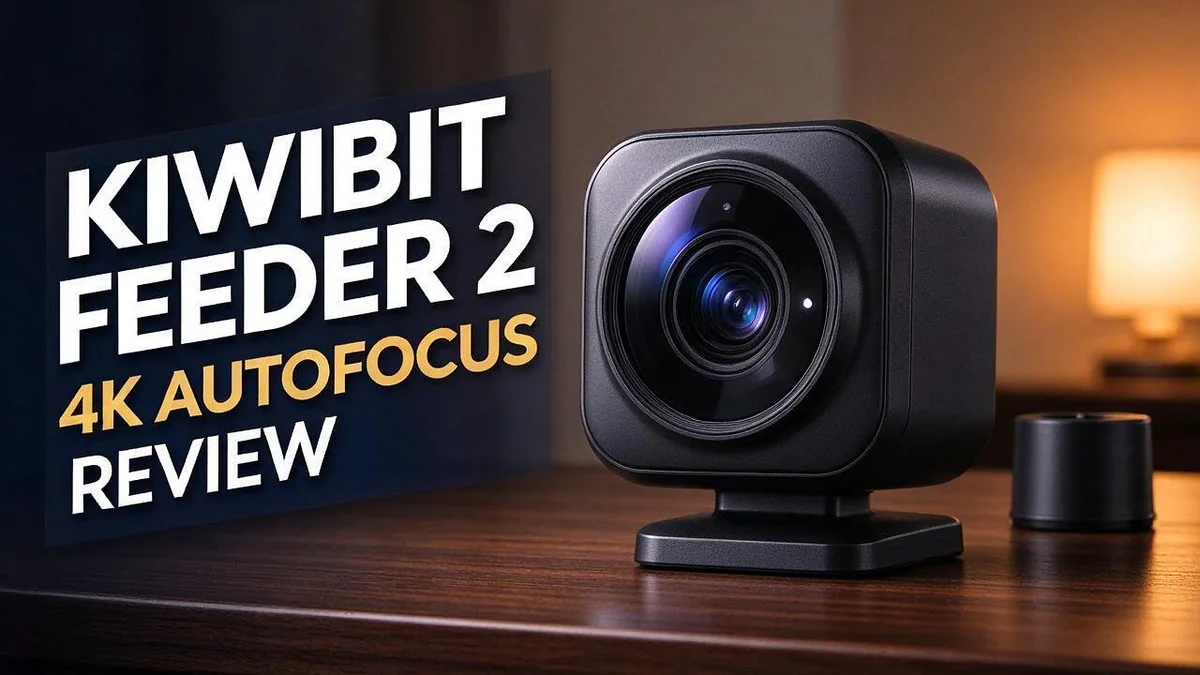
Kiwibit Feeder 2 4K Autofocus Review: Is This Worth It?
Do you want to see backyard birds up close without leaving your couch? The Kiwibit Feeder 2 4K Autofocus promises exactly that.
This smart bird feeder has a true 4K Ultra HD camera and a 130° field of view. It also offers color night vision and solar power.
You watch live on your phone through the Kiwibit app. Smart snapshots catch each visitor, and AI bird identification names the species for you.
In a Nutshell
- Best for: Casual bird fans who want to watch visitors on a phone. Reviewers say it delivers on that promise and makes a thoughtful gift.
- Smart extras: The feeder offers AI bird identification and smart snapshots. The app names your visitors and saves key moments, so you do not need to stare at the screen all day.
- Day and night: It includes color night vision. You can check on early or late visitors after the sun goes down.
- Power setup: The feeder runs on solar power. That means less hassle with cords and charging in an outdoor spot.
- Wi-Fi limit: It connects over 2.4GHz only. Check that your router reaches your backyard before you buy.
- Honest caveat: One reviewer says 4K is not four times the useful detail of 2K. The lens is small, the perch is close, and uploads get compressed. The sources also do not explain the autofocus, so expect good footage but not magic.
Camera Quality and 4K Video Performance


Last update on 2026-10-08 / Affiliate links / Images from Amazon Product Advertising API Some of the links on this website are affiliate links, which means that at no additional cost to you, I earn a commission if you click through and make a purchase. I only recommend products and services that I believe will add value to my readers. Thank you for your support!
Picture quality matters most when birds land close. The feeder’s perch sits near the lens, so visitors fill much of the frame.
Sharpness on your screen depends on more than the camera itself. Video gets compressed before it reaches your phone, which can soften small feather details.
This means the clip you see may look less crisp than the original recording. Slow upload speeds can make the picture look even softer.
Lighting plays a big role too. Place the feeder where soft light falls on the perch. Harsh sunlight can wash out colors and create bright spots on the lens.
Night footage works differently. The image relies on the light near the feeder, so a lamp or porch light can help birds appear clearer after dusk.
Who gets the most from this camera? People who enjoy close looks at common backyard birds will likely feel pleased. Fans who expect sharp detail from far away may feel let down.
A short test helps you judge the view. Watch clips at different times of day before you settle on a spot for the feeder.
Good light and a sensible spot make a big difference. Clean the lens every few weeks so dust does not blur the view. A small wipe can keep footage looking fresh.
Sun direction changes through the seasons, so check the view again every few months. A spot that looked great in summer may need a shift in winter.
Overall, the camera suits viewers who enjoy close, lively views over tiny details. Fans who want the sharpest possible pictures should set clear expectations from the start.
Autofocus and Close-Range Detail
Many bird fans want to see feathers, eye rings, and beak colors up close. Close range shots show these details best.
The sources do not describe autofocus. Nothing in the research confirms how the Kiwibit Feeder 2 adjusts focus. So check the product details first if focus speed matters to you.
Distance plays a big role in detail. A perch a few inches from the lens gives the camera more to work with. Birds farther away can look soft, even with a 4K sensor.
One reviewer points out that the lens is small. The image is cropped to the perch and then compressed for upload. That process can remove some fine detail, so a close bird may still lose sharpness on your phone.
Feeder placement helps. Mount the feeder so the perch sits at a steady, comfortable distance from the lens. Birds that stay in one spot give the camera time to settle into sharp focus.
Perch choice also matters. A short, flat perch keeps birds still for longer. Quick hoppers may blur on screen, which makes any focus issue more obvious.
Try a simple test. Watch several visitors for a day. Note which birds look clear and which look soft. This shows you what the camera does best in your yard.
Clear close views also help you learn bird names. A sharper face or wing pattern makes it easier to match a bird to your field guide.
Close range fans will likely enjoy the view. Casual watchers may find the detail more than enough for everyday fun.
AI Bird Identification and Smart Snapshots
Smart snapshots give you a quick way to keep special moments. Busy mornings often pass before you can open the app. Snapshots let you look back later and choose the best shots for your collection.
The AI bird identification feature adds another layer. It suggests a species name for each visitor. This turns your feeder into a small learning tool for the whole family.
Treat each label as a starting point. AI guesses can be wrong, especially when a bird turns away or sits partly hidden. Compare the label with a field guide or a trusted bird app before you record the sighting.
Keep a simple visit log. Write down the date, time, and bird name from each snapshot. Over a few weeks, you will spot patterns. You might notice which species visit at dawn or after rain.
Sort your snapshots into folders by species. This makes it easy to compare feather colors across seasons. Young birds and adult birds can look very different, so side by side photos help a lot.
Share your best snapshots with friends or a local bird group. Others may confirm an identification or spot a rare visitor you missed. Community feedback makes the hobby more fun and more accurate.
Weather also changes how snapshots look. Bright sun can create harsh shadows, while cloudy days often give softer colors. Notice these patterns so you know when to expect the best results.
If the app offers alerts, adjust them to suit your day. Choose alerts for bird activity and turn off any that feel noisy. This way, you catch new visitors without staring at your phone all day.
Top 3 Alternatives
Bird Buddy Feeder

Last update on 2026-08-27 / Affiliate links / Images from Amazon Product Advertising API Some of the links on this website are affiliate links, which means that at no additional cost to you, I earn a commission if you click through and make a purchase. I only recommend products and services that I believe will add value to my readers. Thank you for your support!
Bird Buddy Feeder is a great pick for anyone who loves watching birds. It has a built-in camera that captures sharp photos of every visitor. The app sends alerts when a bird lands, so you never miss a visit.
It also helps you learn the names of your garden guests. This option suits both beginners and experienced bird watchers.
Birdfy Bird Feeder

Last update on 2026-10-13 / Affiliate links / Images from Amazon Product Advertising API Some of the links on this website are affiliate links, which means that at no additional cost to you, I earn a commission if you click through and make a purchase. I only recommend products and services that I believe will add value to my readers. Thank you for your support!
Birdfy Bird Feeder offers a simple way to enjoy birds from your window. It pairs a camera with smart recognition that identifies many common species. Your photos and videos save to the app, so you can review them later.
Setup is quick and easy. This choice works well for families who want a fun way to spend time outdoors.
Aura Smart Bird Feeder

Last update on 2026-11-19 / Affiliate links / Images from Amazon Product Advertising API Some of the links on this website are affiliate links, which means that at no additional cost to you, I earn a commission if you click through and make a purchase. I only recommend products and services that I believe will add value to my readers. Thank you for your support!
Aura Smart Bird Feeder focuses on clear images and easy use. Its camera captures detailed shots, and the app lets you check on your feeder from anywhere. You can also share photos with friends or family.
If you want a feeder that keeps you connected to nature, this model is worth a look. It fits well in gardens, balconies, and other small outdoor spaces.
Design, Build and Feeder Capacity
The design feels practical from the start. Reviewers describe the Kiwibit Feeder 2 as well designed and functional. It does its main job well, which is bringing backyard birds into view on your phone.
The build feels sturdy enough for outdoor life. A solid body helps the unit stay in place once you mount it. Because it sits in open air all year, that strength matters more than you might expect.
Solar power is a big plus for outdoor setups. You do not need to run a power cord to a tree or fence. Instead, the panel charges during daylight, so you can focus on the birds.
Feeder capacity is the one detail to check yourself. This guide does not list how much seed it holds. Look at the product box or manual before you fill it, so you know how often refills happen.
Think about your typical bird traffic. A busy yard with many visitors may need more frequent refills than a quiet spot. Keep a small scoop nearby so refilling takes only a minute.
Cleaning matters too. Wet seed can spoil, so empty leftover food regularly. A quick rinse keeps the feeding area fresh and helps visiting birds stay healthy.
Good design also makes upkeep simple. Check that the lid seals well after each refill. Clean any loose or damp parts before the next visit.
Mounting and placement can affect durability too. Choose a spot shielded from strong gusts when possible. A stable mount keeps the unit steady and reduces wear over time.
Also check the solar panel regularly. Dust or leaves can block sunlight. A quick wipe helps the unit charge well.
Solar Power and Outdoor Durability
Solar power changes how you set up your feeder. Sunlight does the charging, so you do not need an outlet nearby. Still, the spot you pick matters a lot.
Sun exposure is the key factor. Panels need direct light to charge well. Choose a spot that gets sun for most of the day. Deep shade under thick branches may slow charging.
Seasons also shift the sun. In winter, the sun sits lower and days feel shorter. Check the feeder more often during dark, cloudy weeks. Move it slightly if the panel stays in shadow.
Keep the solar panel clean. Dust, pollen, leaves, and bird droppings can cover the surface. A soft cloth with plain water works well. Wipe the panel every few weeks or after storms.
Rain often rinses the panel for you. Snow is different because it can block sunlight for days. Brush off heavy snow with a soft brush. Avoid sharp tools that could scratch the surface.
Outdoor life tests every part of a device. Heat, cold, and damp air take a toll over time. Check mounting clamps and screws each season. Tighten anything loose so the feeder stays steady.
Track performance for a few weeks. Note any dark stretches when the feeder seems weaker. Compare those days with sunny days. This simple log shows you what your yard needs.
Your results will depend on your local weather and tree cover. Every yard feels different. Trust what you see over general advice, and adjust your setup as you learn.
Wi-Fi Setup and Kiwibit App Experience
Setting up your camera starts with the Kiwibit app. Download the app to your phone first. Then create an account so your feeder stays linked to you.
Next, connect the feeder to your home network. The device uses a 2.4GHz connection, so your router must offer that band. Many homes run two bands under one name, so check your router settings.
Keep your phone close during setup. A strong signal makes pairing much easier. A quick check now saves time later. Stand near the router for the first steps, then move outside once the link works.
Placement matters for the signal too. Walls, metal siding, and thick branches can weaken the link. Shade and distance can also change how well the link holds. Test the spot with your phone before you mount the feeder for good.
Live viewing is where the app shines. Open the live feed to watch birds in real time. A steady connection keeps the picture smooth, so you can check on visitors from the couch or the office.
If the video stutters, look at your network first. Other devices streaming video at the same time can use up bandwidth. Pausing a large download often fixes the problem. Restarting the router also helps in many cases.
Be patient during the first few days. Early loading may feel slower while the connection settles. The feed often steadies after a short time.
Save your setup details before you leave the page. Write down your network name and the steps you followed. This note helps if you ever need to reconnect after a router change.
A few minutes of setup pays off quickly. Once the feed runs smoothly, you can enjoy your backyard visitors every day. Your phone becomes a window into the garden.
Pros and Cons
Pros
- The design feels well thought out and easy to use.
- Footage looks sharp and clear in true 4K Ultra HD.
- Live viewing in the app brings backyard birds straight to your phone.
- The build feels sturdy for outdoor use.
- Many buyers give it as a thoughtful gift for bird lovers.
Cons
- The small lens and upload compression can limit the extra detail you expect from 4K.
- The image crops to a perch close by, so you may see less of the scene than you hope.
- Autofocus is not confirmed in the available information, so check it before you buy.
- Strong sun or heavy tree cover can slow solar charging on some days.
Who Should Buy It
Backyard bird watchers are the main fit for this camera. If you enjoy spotting cardinals and finches from your kitchen window, this feeder suits you well.
New bird fans also benefit a lot. You can learn common species without buying a thick field guide first. The AI bird identification helps you name visitors quickly, which keeps curiosity high.
Families with children make a great match. Kids can watch birds visit from their own phones. Shared viewing turns a simple routine into a fun daily habit for the whole household.
Retirees and people with limited mobility often enjoy this setup too. They can watch wildlife without walking far or standing outside for long stretches. Cold mornings stay comfortable indoors.
Teachers and nature clubs can use the live feed for lessons. Students can track which birds visit during each season. This turns a backyard into a simple classroom tool.
Serious photographers may feel limited, though. If you plan large prints or close crops, you may want a camera with a bigger lens. This model suits casual viewing best.
Casual wildlife fans who want a simple setup will feel right at home. Once the feeder runs smoothly, daily checks take only a minute. Less effort means more time enjoying the birds you love.
Seasonal bird lovers will enjoy this camera most over time. Watching new arrivals each spring and fall builds a fun record of your yard. Long term use shows the real charm of this setup.
Shoppers who need a security camera may want a different tool, since this one centers on birds. Match the camera to your goals before you decide.
Final Verdict
The Kiwibit Feeder 2 4K Autofocus earns a clear recommendation from us. It does what it promises. It turns a simple feeder into a daily window on nature.
The camera works best because it keeps things easy. You open the app, and the birds appear. The AI bird identification adds a fun learning layer, and you soon start to recognize your regular visitors.
Early mornings and dusk bring extra charm. The color night vision helps you catch visitors you would normally miss. That makes the feeder feel active around the clock.
Our rating is 4 out of 5 stars. A few limits keep it from a perfect score. The 4K label sounds bigger than the real gains you will see on screen.
Ask yourself one simple question before you decide. Do you want to enjoy birds, or study every feather? The first goal fits this camera well. The second goal needs more advanced gear.
We also suggest a short test period. Watch the feed for a week and see how often you check the app. If you smile each time, the camera has earned its spot.
Check the full feature list on the product page before you order. Features can change between versions, so a quick look saves surprises.
Our bottom line: the Kiwibit Feeder 2 4K Autofocus is a friendly, fun, and easy to love choice for relaxed bird watching. It brings you closer to your garden visitors and gives you a reason to look outside every day.
Frequently Asked Questions
Can I watch birds at night?
Yes, the camera offers color night vision. You can still see your feeder after the sun goes down. Colors stay visible, so you can spot the markings on visiting birds.
How does the camera connect to my home network?
The camera uses a 2.4GHz connection. Most home routers support this band, so setup stays simple. Keep your phone close by during setup for the smoothest start.
Can the app help me identify the birds I see?
Yes, the Kiwibit app includes AI bird identification. When a bird lands, the app helps you name the species. This makes it fun for kids and new bird fans who want to learn.
Can I save a moment from the live feed?
Yes, you can take smart snapshots right inside the app. Capture a favorite pose or a rare visitor with a few taps. Snapshots make it easy to share your best moments with family and friends.
Does the camera need a power outlet?
No, the camera runs on solar power, so you do not need a wall plug. Place it where it gets steady sunlight during the day. Good light helps keep the camera charged and ready for your next bird visit.

Hello, I’m Emily Price, the founder of Birds Affection. As a passionate bird enthusiast and spiritual seeker, I’ve always been fascinated by the symbolic meanings and mystical connections between birds and our lives. On this website, I share my knowledge and insights on the spiritual significance of various bird species, exploring their roles as messengers, guides, and teachers. Through my writing, I aim to inspire and educate others on the profound wisdom and beauty that birds bring to our world. Join me on this journey as we delve into the enchanting realm of bird symbolism and discover the hidden meanings behind these magnificent creatures.