Camojojo HiBird Smart Bird Feeder Review: Worth It in 2026?
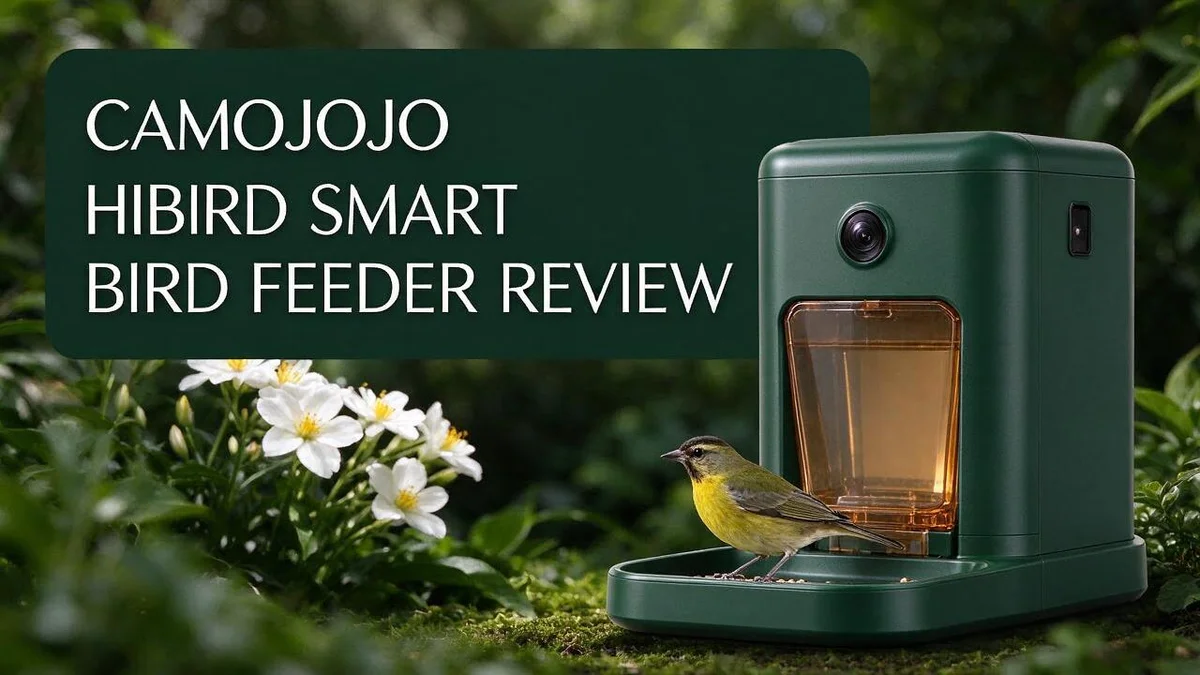
Do you love watching birds in your yard? The Camojojo HiBird Smart Bird Feeder lets you enjoy them from your phone. This feeder packs a 4K HD camera with 32MP photos. It records 4K video and streams live in 1080P. Full colour night vision shows visitors after dark.
The AI names more than 10,000 bird species. The 1.5 L tank holds plenty of seed, so you refill less often. A 10,000 mAh battery powers the feeder outdoors. The product listing also mentions solar power.
In this review, we break down the key features. We also compare it with Bird Buddy and Birdfy. Let’s see if this smart feeder deserves a spot in your garden.
In a Nutshell
- Night and motion coverage: The camera records in full color night vision. It also offers 4× digital zoom and 6× slow motion recording. You can catch fast wings and late visitors in clear detail.
- Live viewing: You can watch your yard through 1080P live streaming. Dual WiFi helps the feeder stay connected outdoors. The video reaches your phone without much fuss.
- Fewer refills: The feeder holds 1.5 L (50.7 oz) of seed. That large capacity means you refill it less often. Busy bird fans will like that.
- Flexible setup: The perch is adjustable. Reports also say the camera works outside the feeder. That gives you more ways to frame your shots.
- App and power: The Hibird Cam app runs on iOS. The product listing also mentions solar power. This helps keep the feeder charged between sunny days.
- Top rivals: Bird Buddy and Birdfy are the main competitors. Our research found no stated cons for the HiBird. We compare it with these rivals later in the review.
Camera and Video Quality

Last update on 2026-07-01 / Affiliate links / Images from Amazon Product Advertising API Some of the links on this website are affiliate links, which means that at no additional cost to you, I earn a commission if you click through and make a purchase. I only recommend products and services that I believe will add value to my readers. Thank you for your support!
The camera on this feeder does more than take simple snapshots. It also helps you see small details that you might miss. Many bird watchers want to catch every move, so this feature stands out.
The camera offers 4× digital zoom for closer views. You can see feather patterns and beak shapes without leaning over the window. Zoom works well for birds that sit a few feet away.
6× slow motion recording adds another fun angle. Quick actions, like a wing flap or a landing, slow down so you can study them. Kids and new bird fans often enjoy this part most.
The camera also switches to higher resolution recording on its own. When a bird lands, the system starts capturing sharper footage. You never need to press a button to get the clip.
Because the camera works outside the feeder, you can watch birds on the ground or on nearby branches. This gives you a wider view of your yard. Many feeders only show the seed tray, so this change feels helpful.
Dual WiFi helps keep the video feed steady. A stable connection matters when you want to watch live. Weak signals can cause lag, so this support makes viewing smoother.
The camera also helps with learning. You can rewatch clips to compare species and behavior. Over time, you build a clearer picture of which birds visit your yard.
Zoom, slow motion, and automatic capture work together nicely. Your bird watching becomes more detailed and more fun. Give this camera a try if you want closer, clearer views of your feathered visitors.
AI Bird Identification Accuracy
Many bird lovers want a name for every visitor. The AI tool tries to give you that name automatically. Its results depend on what the camera captures, so some names will be more reliable than others.
Clear views help the AI most. Good light, a steady bird, and a close perch all make identification easier. Blurry shots or birds zipping past the lens can confuse the system.
Similar birds can cause mistakes. Sparrows, finches, and warblers often share the same colours and shapes. The AI may pick the wrong species when two birds look almost alike.
Compare the name with a field guide. Look at the beak shape, wing markings, and tail length. A quick check helps you trust the result or spot a possible error.
Keep a simple log. Write down each name, the date, and the time. Over a few weeks, you will notice patterns. If the same bird gets different names, you learn where the AI struggles.
The listing does not state an exact accuracy rate. That means you need your own tests. Spend a week reviewing the app results and comparing them with what you see in the yard.
Treat each name as a helpful guess. The AI gives beginners a fun starting point. Experienced watchers can use it as a quick assistant and still rely on their own judgment for final identification.
Feeder Design, Capacity and Perch
A design that works with the camera. The camera needs a clear view of the perch. Place the feeder so the front faces open space. Clear sightlines make every visit easier to record.
Seed stays dry longer. Wet seed can spoil fast. Check the lid and seals after heavy rain. Dry seed keeps birds healthy and happy.
A capacity that suits busy yards. Big yards often draw many birds at once. A large seed chamber gives those birds more food per fill. Track how fast the seed drops so you know when to refill.
Perch height matters for different birds. Small birds like finches prefer a short, steady landing spot. Larger birds such as jays need more room to settle. Try a few heights for a week and note which visitors stay longest.
A steady perch helps the camera. Still birds show their colours and markings. Those details help the AI give better names. Birds that hop around often blur or leave the frame too fast.
Spacing gives birds room. Birds often arrive in groups. Enough space on the feeder reduces squabbles. Watch how many birds land at once before you decide where to add seed.
Seed type shapes your visitors. Black oil sunflower seed draws many species. Safflower can discourage some squirrels and starlings. Offer one seed type at a time so you can see which birds respond.
Mounting height keeps birds calm. Hang the feeder at eye level so you can see it from a window. Birds feel safer when cats cannot reach them easily. Keep the feeder about five feet off the ground.
Weather exposure changes the feel. Strong wind can shake any feeder. Choose a sturdy hook or pole so the perch stays level. A level perch gives birds a safer landing.
Guard against squirrels. Squirrels can climb poles and steal seed. Place the feeder away from nearby branches. Add a baffle or squirrel guard if needed.
Keep the feeder clean. Old seed can grow mold. Empty and wipe the tray every week. Clean parts help birds stay healthy.
Good design leads to better views. Smart placement, dry seed, and a steady perch work together. Check these parts every month. Your camera will reward you with clearer clips.
Top 3 Alternatives
Bird Buddy

Last update on 2026-08-27 / Affiliate links / Images from Amazon Product Advertising API Some of the links on this website are affiliate links, which means that at no additional cost to you, I earn a commission if you click through and make a purchase. I only recommend products and services that I believe will add value to my readers. Thank you for your support!
Bird Buddy is a smart feeder with a built-in camera.
It takes sharp photos and short videos of visiting birds.
The companion app identifies each species for you.
So you learn something new every day.
Setup takes only a few minutes. It fits most balconies, patios, and backyards.
Netvue Birdfy

Last update on 2026-07-01 / Affiliate links / Images from Amazon Product Advertising API Some of the links on this website are affiliate links, which means that at no additional cost to you, I earn a commission if you click through and make a purchase. I only recommend products and services that I believe will add value to my readers. Thank you for your support!
Netvue Birdfy suits bird lovers who want a camera and cloud storage.
You can watch live video from anywhere using your phone.
The device uses artificial intelligence to spot and name birds.
You can also review past visits, so you never miss a rare guest.
Setup is quick, and the feeder works well in a yard or on a balcony.
Aura Smart Feeder

Last update on 2026-11-19 / Affiliate links / Images from Amazon Product Advertising API Some of the links on this website are affiliate links, which means that at no additional cost to you, I earn a commission if you click through and make a purchase. I only recommend products and services that I believe will add value to my readers. Thank you for your support!
Aura Smart Feeder takes a different path with a clean, simple design.
It focuses on a calm daily routine for you and your feathered friends.
The feeder includes a camera that records moments at the perch.
Its gentle look blends into any garden or patio.
Many people enjoy watching their visitors arrive each morning.
Power, Solar Charging and Battery Life
The HiBird Smart Bird Feeder uses a built in battery. It holds 10,000 mAh of power. That capacity keeps the camera ready between sunny spells.
The product listing says the feeder is solar powered. Panels collect daylight and send energy to the battery. You can hang it outdoors without running a power cable.
Sunlight matters most. A spot with steady daylight helps the panel charge well. Shade from trees or a roof can slow things down. Check the spot before you mount the feeder.
Battery life depends on use. Live streaming, night vision, and automatic video capture all draw power. Busy mornings with many visitors may drain the battery faster than quiet days.
Open the Hibird Cam app to check the battery level. Set a reminder on your phone to look at it each week. Winter days are shorter, so check more often during those months.
Cold weather can also affect how well a battery holds a charge. Frosty mornings may reduce performance for a short time. Keep the panel clear of snow when possible.
Simple care keeps power steady. Wipe the solar panel every few weeks. Dust, pollen, and droppings block light. Trim nearby branches so leaves do not cast shadows.
Plan for backup power if your yard stays shady. A small outdoor power option can help during long gray spells. This keeps the camera from going dark in the middle of the season.
The listing does not give exact runtime figures. No charging times or battery hours appear in the research.
Track how long the feeder runs during sunny and cloudy weeks. Your own notes will show the real picture.
WiFi Connectivity and Hibird Cam App Experience
Strong WiFi keeps your feeder online. The HiBird Smart Bird Feeder uses dual WiFi, so it can connect to your home network with ease. Place it within a comfortable range of your router so the signal stays steady. A strong signal also keeps alerts arriving on time.
Live streaming needs a good connection. The camera sends 1080P video to your phone while you watch. A weak signal can cause choppy frames or delays. Test the stream from the spot where you plan to mount the feeder before you leave it outside.
The Hibird Cam app works as the main control center. Setup walks you through adding the feeder, joining WiFi, and naming your device. Keep the app open during setup so you can see each step finish.
Notifications help you catch visitors as they arrive. You can set alerts for motion or new activity, so you do not need to watch the screen all day.
Automatic video capture also works through the connection. When a bird lands, the feeder records higher resolution clips and saves them for later viewing. Clips save in the app, so you can rewatch your favourite moments. These clips often show details that live streams miss, such as feather patterns.
Night vision adds a new view. Full colour night vision lets you watch after dark, so you can check the yard at any hour.
If the feeder drops offline, move it closer to the router or add a WiFi extender near the yard. A little planning keeps your connection steady.
The companion app currently lists iOS support. Android users should check the app store listing before they buy the feeder. This simple check avoids surprises during setup.
Setup, Placement and Weather Durability
Setup starts with a simple plan. Lay out all the parts first. Check that the camera, the feeder tray, and the mounting parts are all present. This small step saves time later.
Charge the battery before you go outside. A full charge gives the system a head start. Once it is charged, you can test the camera indoors. This helps you catch any problems before the feeder sits in the rain.
Test the camera view before final mounting. Watch the live picture on your phone. Turn the camera until the feeding area fills the frame. Small changes in angle make a big difference.
Pick a spot that stays stable. Wind can shake a light feeder and blur the video. Choose a post, wall, or sturdy bracket that does not sway. A steady frame gives you clearer footage.
Think about rain and moisture. The feeder works outdoors, but no specific waterproof rating appears in the product details. Place it under a small roof, eave, or tree branch when possible. This shelter helps protect the electronics from heavy rain.
Plan for heat and cold. Strong summer sun can warm the housing and dry out seed fast. Afternoon shade keeps the housing cooler and the seed fresher.
Check the lens after storms. Dust, pollen, and water spots can cloud the camera. Frost can also cloud the lens in winter. A soft dry cloth keeps the picture sharp. Wipe the lens gently, and avoid harsh cleaners that could scratch it.
Inspect the mount every season. Loose screws can let the feeder tilt. Tighten the fittings each spring and autumn. This quick check keeps your view steady all year.
Pros and Cons
Pros
– Large capacity holds 1.5 L of seed, so you refill less often.
– The camera reportedly works outside the feeder, which widens your view.
– AI identifies over 10,000 species, so you learn who visits.
– Zoom up to 4x and slow motion at 6x reveal small details.
– The adjustable perch suits different bird sizes.
Cons
– The companion app is listed for iOS only.
– The research lists no drawbacks, so check owner reviews before you buy.
– Exact species accuracy figures are not given.
– Durability data over many seasons is not available yet.
Who Should Buy It
Some shoppers will get more from this feeder than others. Here is a closer look at who should consider it.
Curious beginners are a great fit. New bird fans often wonder which visitors stop by their yard. This device answers that question without any guesswork.
Families with children can also enjoy it. Kids get a close view of nature from their own backyard. Everyone can gather around a phone and guess which bird arrives next.
Busy people may find it helpful. If you travel or work long days, you may not check the feeder often. A large seed supply keeps your visitors fed between your trips.
Photography fans will likely enjoy the camera. You can capture sharp views of feathers and quick movements. Slow motion clips make fun videos to share with friends.
Other shoppers should think twice. Homes with weak internet signals may need extra planning before setup. Owners of Android phones should check app access first, since the companion app only runs on iOS.
Cautious buyers who like long track records may want more information. Reading owner feedback can help you judge daily use. Shoppers comparing Bird Buddy and Birdfy should also list the features that matter most to them. This simple list makes the final choice much easier.
Final Verdict
The Camojojo HiBird Smart Bird Feeder is a strong pick for anyone who wants a smart feeder that does plenty. It blends a sharp camera, species ID, and a roomy seed tank in one unit.
Our verdict: a promising feeder with real appeal. The 4K camera and dual WiFi give it a modern edge. Solar power, per the product listing, should also cut down on plug in trips.
The biggest win is saved effort. You spend less time on chores and more time enjoying birds. The app turns each visit into a small lesson.
A few cautions remain. The research lists no drawbacks, but that does not guarantee a flawless record. Real owner feedback will show how it handles daily use over time.
Check how the app and WiFi behave at your own yard distance. A weak signal can limit live viewing.
Compare before you commit. Bird Buddy and Birdfy are the main rivals. Look at app features, camera details, and support side by side.
Think about your own habits too. Will you check the app daily? Do you want alerts, clips, or quiet relaxation? Your answers point to the right feeder.
Gift buyers may like it as well. A camera feeder makes a fun surprise for nature lovers, and the idea is easy to enjoy.
Final recommendation: The HiBird deserves a spot on your shortlist. It suits people who want video quality and easy bird learning in one package.
Read recent owner reviews, confirm your must have features, and then decide with confidence. The overall outlook is positive, and your backyard could soon feel a lot more alive.
Frequently Asked Questions
Does the Camojojo HiBird work outdoors?
Yes, the feeder is made for outdoor use. The research does not list a waterproof rating, so check the product details before you mount it in a rainy spot.
Can I watch birds when I am away?
Yes. The Hibird Cam app streams live video at 1080P. Keep in mind that the app is listed for iOS only.
Will the feeder tell me which birds visit?
Yes. The built in AI can identify more than 10,000 species. Exact accuracy figures are not given, so watch it for a few weeks to see how well it matches your local birds.
Can the camera record after dark?
Yes. The night vision records in full colour. Clarity at night is not covered in the research, so test it early to see if the footage meets your needs.
How long can the battery run?
The built in battery holds 10,000 mAh. Solar charging helps keep it topped up. The research does not say how many days it lasts in cloudy weather, so plan a backup charge for gloomy seasons.

Hello, I’m Emily Price, the founder of Birds Affection. As a passionate bird enthusiast and spiritual seeker, I’ve always been fascinated by the symbolic meanings and mystical connections between birds and our lives. On this website, I share my knowledge and insights on the spiritual significance of various bird species, exploring their roles as messengers, guides, and teachers. Through my writing, I aim to inspire and educate others on the profound wisdom and beauty that birds bring to our world. Join me on this journey as we delve into the enchanting realm of bird symbolism and discover the hidden meanings behind these magnificent creatures.