Tactacam Reveal X Gen 3.0 Review: A Comprehensive Guide
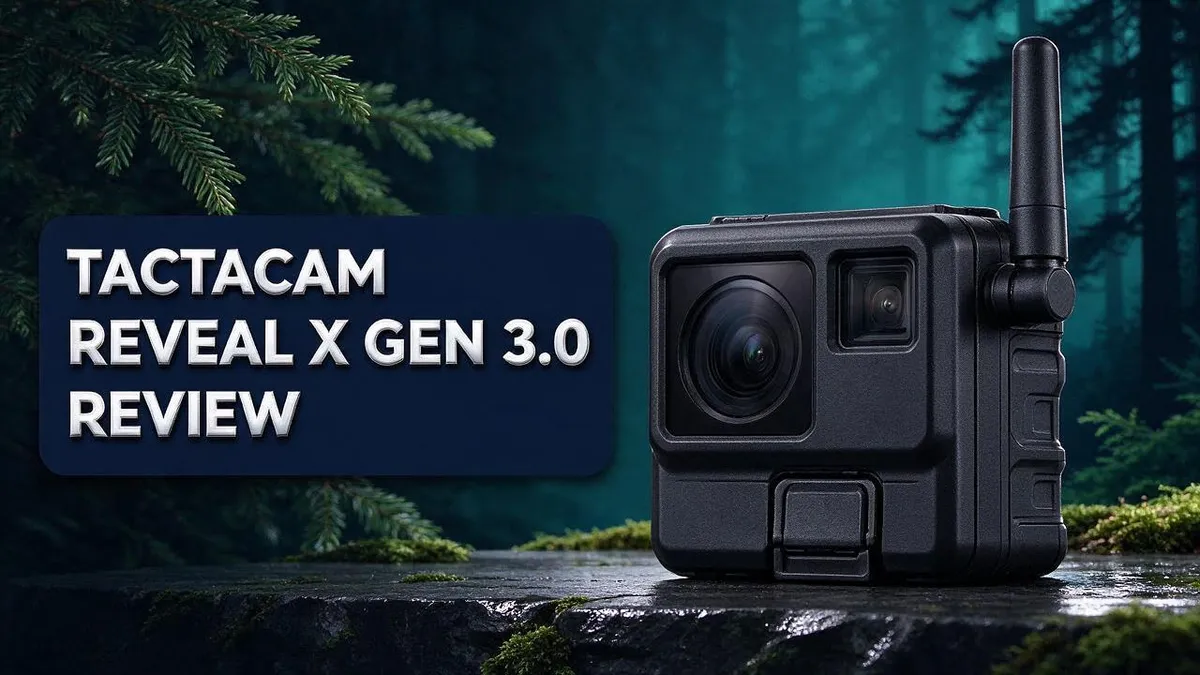
Want to see what walks past your trail camera without hiking out to check it? The Tactacam Reveal X Gen 3.0 aims to make that possible.
This cellular camera sends photos and 1080p video straight to your phone. It also offers onboard Wi-Fi, live view, and fully integrated GPS. The Low Glow IR flash reaches 96 feet at night.
Users praise the instant phone delivery and the solar battery life. Some reviews also mention trigger issues, plus battery and setup problems.
In this review, we break down what works and what falls short. You will know if this camera fits your property by the end.
In a Nutshell
-
Live view and app aiming let you check your camera angle from your phone. You can fix the aim without walking into the woods.
-
Fully integrated GPS helps you track where each camera sits. A preinstalled, extra durable antenna supports a steadier cellular signal.
-
Low Glow IR flash handles night shots with a 96 foot detection range. The softer flash helps keep your setup discreet after dark.
-
New aspect ratios give you more control over how your images look. Sending speeds also run faster than earlier models.
-
Trigger issues show up in some reviews of the 3.0 model. This is the biggest drawback to weigh before you buy.
-
Battery life and setup problems appear in Reveal Pro 3.0 reviews. Those same reviews praise clear photos, and one user mentions responsive customer service.
Key Features and Specs

Last update on 2026-10-13 / Affiliate links / Images from Amazon Product Advertising API Some of the links on this website are affiliate links, which means that at no additional cost to you, I earn a commission if you click through and make a purchase. I only recommend products and services that I believe will add value to my readers. Thank you for your support!
The camera comes with a built in antenna that feels tough enough for rough weather. You do not need to add a separate antenna in the field. That matters if you hunt in deep woods or open country.
Onboard Wi-Fi gives you another way to reach your images. Stand near the camera, connect directly, and skip the cell network. This works well for quick checks during a hunt.
Faster sending is another highlight. The Gen 3.0 moves files more quickly than prior models, so you wait less for alerts. Quick delivery helps you act sooner.
Image clarity also stands out in owner feedback. Reviewers of the Reveal Pro 3.0 often mention sharp, detailed photos. Clear images make it easier to tell animals apart at a glance.
Before you buy, check your cell signal. Coverage varies by location, so test your spot first. A weak signal can slow delivery, even with a fast camera.
Wi-Fi and cellular work well together. Use cell for remote alerts and Wi-Fi for close range checks. This mix gives you flexible access to your trail data.
Hunters who scout several locations benefit most. Each camera sends its own photos, so you can compare activity across sites. This helps you pick the best stand for your next trip.
Think about your routine too. Frequent checkers will love the instant alerts. Occasional users may value the remote view more than constant updates. Know your needs first, then decide if these features fit your goals.
Image and Video Quality
Good image quality helps you judge a trail camera visit in seconds. A blurry photo can hide antlers, tracks, or key details. Sharp detail makes every check worth your time.
Lighting plays a big role in how your photos turn out. Early morning and late evening often bring the best color and contrast. Midday sun can wash out shadows, so plan your checks with that in mind.
Weather also shapes image quality. Fog, rain, and snow can reduce contrast in your photos. Pick a spot that limits harsh exposure swings when you can.
Camera height and angle change what you capture. Mount the unit at a comfortable height, then aim it so the trail fills most of the frame. Take a few test shots before you leave the site.
Keep the lens clean for better results. Dust, rain spots, or spider webs can soften an image. Wipe the lens gently with a soft cloth each time you visit.
Video clarity depends on how fast animals move. Fast movement close to the lens can look slightly blurred. Position the camera so animals cross the view rather than walk straight at it.
Check your settings before the season starts. Review sensitivity and timing options so they match your goals. A quick test run can save you from missing key moments.
Review photos on a larger screen when possible. Small phone displays can hide focus or exposure problems. Pulling images onto a computer helps you spot flaws early.
Consistent results come from routine. Compare photos from the same spot over several weeks. Those comparisons make patterns easy to see.
Night Vision and Detection Range
Night sessions reveal a lot about deer and other wildlife. Many animals move most after dark. So your camera must catch them when the sun is gone.
Plan your detection zone first. Walk the trail and mark where you want the camera to trigger. Stand where the animal walks, then check how far the camera sees from that spot. Clear small branches and tall grass that could block the view.
Infrared light can startle some animals. Some wildlife may notice the glow and change direction. Place the camera off the main path to reduce this risk. Aim it so animals cross the view instead of walking straight at the lens.
Watch for false triggers at night. Moving branches, blowing leaves, and warm air can set off the sensor. Trim brush near the camera. Choose a spot where shadows do not sweep across the frame after dark.
Know the eye shine. Animals often show glowing eyes in night photos. This glow helps you spot them in a quick scan. Note which species show up near a water source or feeding area so you learn their patterns.
Think about animal speed after dark. Fast movers may blur even with a flash. Place the camera where animals pause, such as near a log or gate. These slower moments give the camera more time to capture a clear frame.
Test the camera at dusk and dawn. These times bring the biggest light shifts. Walk back after a test session and review how the frames look. Adjust the angle if an animal leaves the frame too fast.
Keep a simple night log. Write down the date, time, and moon phase for each visit. Over a few weeks, you will see when animals move most. This habit helps you know when night photos are most likely.
Top 3 Alternatives
Browning Strike Force

Last update on 2026-11-19 / Affiliate links / Images from Amazon Product Advertising API Some of the links on this website are affiliate links, which means that at no additional cost to you, I earn a commission if you click through and make a purchase. I only recommend products and services that I believe will add value to my readers. Thank you for your support!
Many hunters want a trail camera that reacts fast. The Browning Strike Force offers a quick trigger and sharp daytime photos. It captures action without long delays, so you rarely miss the moment. Its solid build handles rain, dust, and rough trails. The camera also works well for scouting throughout the year.
Best for: Hunters who want dependable images in every season.
Spypoint Force Pro

Last update on 2026-11-19 / Affiliate links / Images from Amazon Product Advertising API Some of the links on this website are affiliate links, which means that at no additional cost to you, I earn a commission if you click through and make a purchase. I only recommend products and services that I believe will add value to my readers. Thank you for your support!
Setup should feel simple, not stressful. The Spypoint Force Pro makes installation easy with clear menus and a straightforward design. You can adjust settings in minutes and start monitoring your land right away. Its night images stay bright and detailed. Users who want quick access to their photos will appreciate how easily they can review and manage their captures.
Best for: Beginners and busy outdoor fans who want a no fuss option.
Bushnell Core DS


Last update on 2026-11-19 / Affiliate links / Images from Amazon Product Advertising API Some of the links on this website are affiliate links, which means that at no additional cost to you, I earn a commission if you click through and make a purchase. I only recommend products and services that I believe will add value to my readers. Thank you for your support!
Some wildlife watchers prefer a camera that stays hidden after dark. The Bushnell Core DS uses a low light design, so it keeps night scenes natural and calm. Animals often walk past without noticing the camera. This makes it a good choice for observing shy creatures. It also suits backyard monitoring, where discreet placement matters most.
Best for: Wildlife watchers who want discreet monitoring after dark.
Cellular Connectivity, Live View and App Experience
Cellular connectivity changes how you learn about your property. Instead of walking in to pull a card, you get updates on your phone. That saves time and keeps your scent off the trail.
Live view gives you a real look at the scene right now. You can check whether a buck is passing through or a stand needs a new position. Use it before you climb up to hunt.
The app handles most of the work from your phone. You can aim the camera, review shots, and adjust settings in one place. Keep the app updated so new features work correctly.
A short walk with your phone shows whether the spot holds a strong connection. Weak service can slow updates or stop live view. Test each location before you lock the camera down.
Solar charging earns praise in user reviews. Still, check the battery reading each week during heavy use.
Customer service earned praise in one review. A quick call can help if setup feels confusing. Reach out early so you can enjoy your season.
Strong service and a clear app give you control from anywhere. You can monitor your sites while you work, travel, or rest at camp.
Instant phone delivery keeps you informed when the camera sends new images. You can skip empty days and focus on active nights.
Use the app on a few test days. Learn where each menu sits so you move fast in the field. Quick access saves time when animals appear.
Pair the app with a note system. Record the date, moon phase, and weather for each capture. Over time, your log reveals patterns that guide your next setup.
Setup, Battery and Solar Power
Setup takes a little patience. Many owners say the first run needs extra time. Read the manual before you head into the woods.
Start by inserting the batteries and an SD card. Format the card inside the camera first. Then set the date and time so every photo shows the right timestamp.
Battery life is a common complaint. Reviews of the Reveal Pro 3.0 mention faster drain than expected. Check the power level every week during the season.
Cold air can drain batteries faster. Expect shorter runs during winter mornings and late nights.
Keep spare batteries on hand. A fresh set lets you swap quickly when power dips. Charge the spares at home before each trip.
Solar panel placement matters a lot. Point the panel toward the sun for the longest part of the day. Trim branches that shade the panel, because shade slows charging.
Dust, pollen, and snow can cover the panel. Wipe it gently with a soft cloth after storms or long dry spells. Check the panel once a week during busy months.
Mount the camera firmly. Tighten the strap well so wind cannot shift the angle. Recheck the aim after the first week.
Watch for trigger issues. Some owners report trigger problems with the 3.0 model. Run a walk test at the site before you leave.
Sensitivity settings also matter. Start with a middle setting, then adjust after a few days of photos.
Keep a simple log. Write down the battery level, the date, and the weather on each visit. Patterns show up fast, and they help you plan your next setup.
Trigger Reliability and Durability
Trigger reliability matters more than many buyers expect. A camera that misses a deer leaves you with nothing to review.
The Reveal X Gen 3.0 has drawn mixed feedback on this point. Test it yourself before you trust it.
Start with a daylight walk test. Step in front of the lens at a normal pace. Count how many photos the camera takes.
Repeat the walk at several distances. Close range and far range can behave differently. Write down each result.
Trigger speed also deserves attention. Some owners describe a delay between movement and the photo. A slow response can miss a fast animal.
Durability starts with the housing. Rain, mud, and heavy dew test every seal on the case.
After a wet day, open the case and check for moisture. Look at the seals, the latch, and the battery compartment.
Dry every part fully before you close it again. Trapped water can cause corrosion over time.
Heat matters too. Direct sun can warm the case and affect the sensor. Shade the camera when you can, but keep the lens clear.
Cold snaps can also stress the plastic parts. Check the latch and strap each season for cracks or loose fittings.
Keep the SD card dry and secure. A loose card or a worn slot can stop recording without warning.
Check the card status on every visit. Swap it out if you notice errors or slow writes.
Keep a simple reliability log. Note the date, weather, and how many triggers you saw.
Over a few weeks, patterns show up fast. If misses keep happening, contact the seller and ask about support options. Keep those notes for your records.
Pros and Cons
Pros
– Clear photos stand out in Reveal Pro 3.0 owner reviews.
– 1080p video adds motion detail to your scouting.
– The infrared flash helps you spot activity after dark.
– Faster sending than earlier models saves you time.
– Cellular connectivity works well for remote spots.
Cons
– Most reliability feedback comes from the Pro line, so proof for the 3.0 is limited.
– The praise for customer service rests on a single review.
– Long-term durability reports are hard to find.
Who Should Buy It
The Tactacam Reveal X Gen 3.0 fits hunters who want updates without the hike. Remote hunters are a strong match. If you live hours from your land, this camera keeps you informed.
Property owners and land managers also benefit. You can check several sites from one place. Live view lets you see the scene before you drive out.
Public land hunters fit well too. You rarely hunt the same spot twice in a week. Phone alerts help you pick the best spot for your next hunt.
Busy hunters with short weekends gain the most. Every photo matters when you have only a few days. Seeing real activity helps you plan with confidence.
Tech fans often enjoy this model most. The newer aspect ratios and app controls give you more ways to frame each shot. Practice with the settings at home before opening day.
Hunters who track patterns gain more from this camera. Each photo shows a time and date stamp you can review later. Those notes help you plan stand moves before the season starts.
Who should think twice? Buyers who prefer widely tested designs may want to wait.
Current feedback on the 3.0 model is still thin. Casual users who check a camera once a month may find simpler options easier.
In short, this camera suits active scouts who value distance and speed. Match it to your habits before you buy.
Final Verdict
The Tactacam Reveal X Gen 3.0 is a strong cellular camera with a few open questions. It brings useful features that save time in the field. It also needs more real owner feedback before it earns full trust.
Live view and app aiming are the standout upgrades. You can check your angle from your phone and fix it on the spot. That cuts down wasted trips and bad framing.
The fully integrated GPS adds another practical touch. It helps you keep track of each camera across a large property. The extra durable antenna, already installed, also removes one setup chore.
Battery and setup need a careful eye. Owners of the Pro 3.0 often mention both. Solar battery life gets praise in reviews, so a solar panel looks like a smart pairing.
Plan your first week with care. Set up the camera at home, test the signal, and confirm your alerts work. Then place it in the field and review the first batch of images.
The new aspect ratio options give you more control over how photos look. That feature helps when you share images or compare pictures over time.
Final Rating
Good, with room to grow. The features are strong and the speed is appealing. The limited long term proof keeps this camera from a top score for now.
Our advice: Buy it if live aiming and quick delivery matter most to you. Wait if you want years of proven results first.
Either way, the Reveal X Gen 3.0 shows that Tactacam keeps pushing cellular scouting forward. Check the latest owner feedback before you decide.
Frequently Asked Questions
How far can this camera detect movement?
The Tactacam Reveal X Gen 3.0 has a 96 ft detection range. Aim the lens so your trail or feeder sits inside that zone. Animals farther away may not trigger a photo. Place the camera closer to the spot you want to monitor, and check the view before you leave.
Why do some owners report trigger problems?
Research shows trigger issues reported with the 3.0 model. Walk in front of the lens before you leave the site. Confirm that each pass creates a photo or alert. If the camera misses you, adjust the angle and test again.
How do I stop missed shots?
Mount the camera at a steady height. Point it at the path, not at open sky. Clear away brush and branches that sway in the wind. Moving plants can trigger false alerts and can also block the view of real animals.
Should I still check the camera often?
Yes, you should still check it often. Fast alerts help you stay informed. However, they do not replace a quick visit. Look at the lens, the mount, and the battery every few weeks. Regular checks keep your setup working well all season.

Hello, I’m Emily Price, the founder of Birds Affection. As a passionate bird enthusiast and spiritual seeker, I’ve always been fascinated by the symbolic meanings and mystical connections between birds and our lives. On this website, I share my knowledge and insights on the spiritual significance of various bird species, exploring their roles as messengers, guides, and teachers. Through my writing, I aim to inspire and educate others on the profound wisdom and beauty that birds bring to our world. Join me on this journey as we delve into the enchanting realm of bird symbolism and discover the hidden meanings behind these magnificent creatures.